
AI Tools Reviewer
For software development teams, the promise of AI often feels like a distant future, but Monday.com AI brings it firmly into the present, transforming everything from sprint planning to bug triaging. While it demands an initial setup investment, its potential to streamline workflows and reduce manual overhead makes it a compelling, and often surprising, contender in the crowded field of project management.
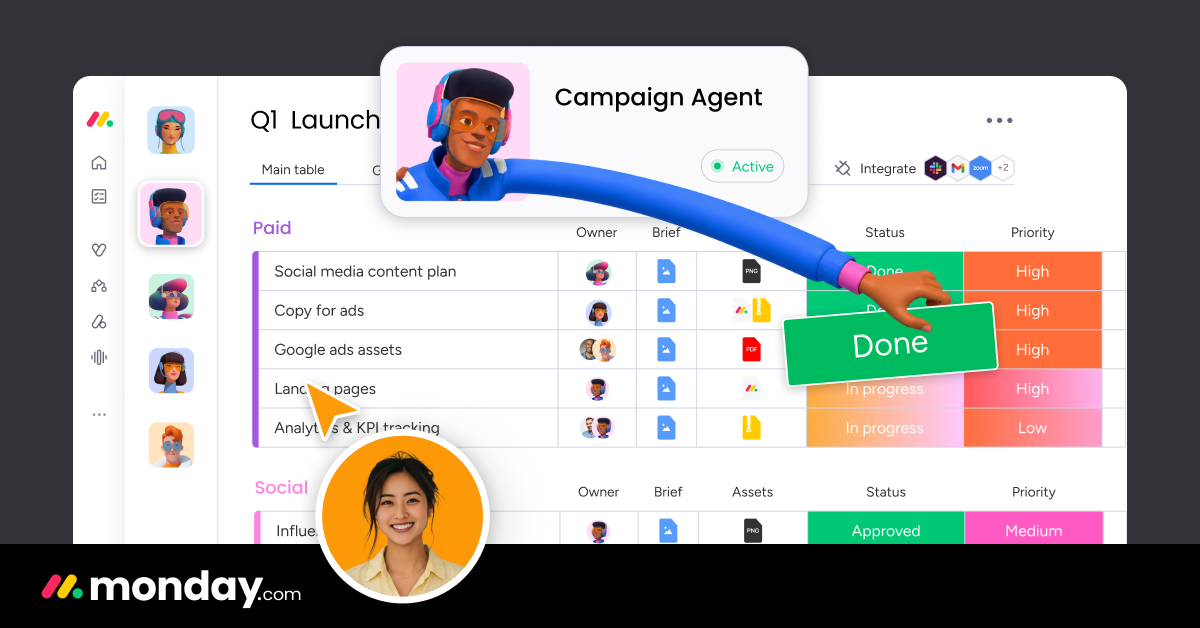
Image: Monday.com
TL;DR
Monday.com AI is a powerful, integrated solution for software development teams seeking to automate repetitive tasks, enhance collaboration, and gain deeper insights into their project workflows. Its core strength lies in leveraging AI Agents, Sidekick AI, and AI Columns to automate sprint planning, bug tracking, and reporting, significantly reducing manual effort. It’s ideal for agile teams looking for a centralized work operating system that can adapt to their unique processes. While the platform requires a dedicated effort for initial setup and configuration, especially for complex dev workflows, the long-term gains in efficiency and clarity are substantial. Teams currently drowning in manual updates, disconnected tools, or unclear sprint progress will find Monday.com AI a game-changer, provided they are willing to invest in its full implementation.
AI-Powered Sprint & Project Planning
One of the most significant advantages Monday.com AI offers to software development teams is its ability to revolutionize sprint and project planning. Gone are the days of tedious manual backlog grooming and effort estimation. With Monday.com AI, features like ‘AI Agents’ can be configured to autonomously manage tasks, automatically creating sub-tasks for new features, or even suggesting sprint backlogs based on larger epics defined within your boards. Imagine defining a new product feature, and an AI Agent, understanding your team’s typical workflow and task breakdown, populates your sprint board with estimated tasks and dependencies. This capability alone can save hours of planning meetings, allowing developers to focus on actual coding.
The ‘Sidekick AI assistant’ acts as an intelligent co-pilot, surfacing relevant information, suggesting next steps, and helping format detailed task descriptions. When a new user story comes in, Sidekick can help flesh out acceptance criteria or propose test cases by analyzing existing project documentation. For stand-up meetings, it can quickly generate summaries of progress based on board updates, highlighting potential blockers or delays. This context-aware assistance ensures that planning is not just faster, but also more comprehensive and informed.
Furthermore, ‘AI Columns’ can be integrated directly into your sprint boards. These columns can perform various intelligent functions, such as automatically categorizing incoming issues based on their description (e.g., ‘Bug’, ‘Feature Request’, ‘Improvement’), estimating task complexity (e.g., ‘Small’, ‘Medium’, ‘Large’) by analyzing historical data, or even predicting potential overruns based on current progress. For teams integrating with Git, Monday.com AI can track code reviews, pull request statuses, and deployments, linking them directly to tasks and tickets. This granular integration means your project plan is always a living, breathing reflection of your development cycle, updated in real-time with AI-driven insights.
Setting up these capabilities involves creating specific boards for sprints, feature requests, and bug tracking. Within these boards, you configure AI Columns to perform desired automations and define the rules for your AI Agents. For example, a board tracking feature requests can use an AI Column to automatically assign a priority score based on keywords like “critical” or “user impact.” Similarly, a sprint board can have an AI Agent that automatically moves tasks to “In Review” once a linked pull request is merged. These AI features are generally available from the Standard plan upwards, with the more sophisticated AI Workflow Builder appearing in the Pro tier, offering escalating levels of automation power for development teams.
Image: Monday.com
Automated Workflows & Bug Tracking
Beyond planning, Monday.com AI shines in automating complex development workflows and streamlining one of the most critical aspects of software development: bug tracking. The ‘AI Workflow Builder’, available in the Pro and Enterprise plans, is particularly transformative. This feature allows teams to orchestrate sequences of AI Agents and human tasks, creating intelligent, self-optimizing workflows that span across multiple boards and departments. For instance, when a bug is reported via an integrated form or email, an AI Agent can be configured to read the description, triage it based on severity keywords, assign it to the appropriate developer or team, and automatically update its status. This significantly reduces the time from bug report to resolution, eliminating manual triage bottlenecks.
Consider a scenario where a new bug report comes in: an AI Agent first analyzes the description to determine if it’s a critical production issue. If so, it might automatically notify the on-call engineer via Slack, create a high-priority task, and populate it with relevant diagnostic information. If it’s a lower-priority UI bug, the AI might categorize it, assign it to the front-end team’s backlog, and schedule it for the next sprint review. This intelligent routing ensures that issues are addressed by the right people, with the right urgency, without any human intervention.
The platform’s automation capabilities extend to integrating with Continuous Integration/Continuous Deployment (CI/CD) pipelines. Teams can configure automations that update tasks on Monday.com boards when specific events occur in their CI/CD system. For example, a task status can automatically change from “In Progress” to “Ready for QA” once a feature branch is merged into the staging environment. If a build fails, an AI Agent could create a new bug task, linking it directly to the failed build log, and assign it to the responsible developer. This level of integration ensures that the project management platform always reflects the true state of the development pipeline, providing unparalleled transparency.
Moreover, AI can play a proactive role in quality assurance. By analyzing patterns in past bug reports, an AI Column or Agent could identify common failure points in the codebase or specific modules that frequently generate issues. This insight can then be used to inform future testing strategies, allocate more resources to problematic areas, or even trigger automated code reviews focusing on those patterns. This transforms bug tracking from a reactive process into a more predictive and preventative one, ultimately leading to higher quality software and more efficient development cycles.
Initial Setup Complexity & AI Credit Usage
While Monday.com AI offers a compelling vision for automated software development, it’s not without its challenges. The most significant hurdle for many teams will be the initial setup complexity. Unlike simpler project management tools, Monday.com is a Work OS, meaning its power lies in its immense customizability. For software development teams, this translates to designing intricate boards, configuring numerous automation rules, and carefully defining the logic for AI Agents and AI Columns to align with specific development workflows (e.g., Agile, Scrum, Kanban, or hybrid models). This requires a significant upfront investment of time and effort to tailor the platform to precisely fit existing processes, integrate with external tools like Git repositories, and train team members on the new paradigm.
A poorly configured setup can lead to more confusion than clarity, generating irrelevant AI suggestions or misrouted tasks. Teams need to dedicate resources, often an experienced project manager or technical lead, to design, test, and iterate on their Monday.com AI implementation. For smaller teams with limited administrative capacity, this initial ramp-up can feel daunting and time-consuming, potentially delaying the realization of its full benefits. It’s not a plug-and-play solution for complex development ecosystems; it requires strategic planning and meticulous execution.
Another crucial consideration is the platform’s reliance on “AI credits.” While Monday.com is transparent about its tiered pricing, the consumption of AI credits can become a hidden cost for teams with heavy AI usage. Every AI-driven action – from an AI Agent automatically triaging a bug, to Sidekick generating a summary, or an AI Column categorizing tasks – consumes credits. While lower tiers offer a baseline number of credits, rapidly scaling teams or those that heavily lean on AI automations for every aspect of their workflow might find themselves needing to purchase additional credits. This can inflate the overall operational cost, making the “value assessment” a moving target. It requires careful monitoring and optimization of AI workflows to ensure credit usage remains within budget, adding another layer of management.
Finally, for deeply technical teams, Monday.com AI might still feel like a high-level orchestration tool rather than a true development-centric assistant. While it integrates with Git and other tools, it doesn’t offer the deep, native IDE integration found in specialized AI coding assistants like GitHub Copilot or Cursor. Developers might still need to switch contexts between their IDE and Monday.com, even if AI automates much of the reporting. This isn’t necessarily a weakness, but rather a distinction in its primary function: it excels at project and workflow management with AI, not as a direct coding companion.
Image: Monday.com
How It Compares
When evaluating Monday.com AI for software development, it’s essential to understand its position against established and emerging competitors. Two major players often considered are Jira and ClickUp, each offering a different philosophy towards project management and AI integration.
Jira: Traditionally, Jira has been the undisputed king for software development teams, offering highly granular control over issue tracking, workflows, and integrations with development tools. Its strengths lie in its deep configurability for Agile methodologies, robust reporting, and extensive ecosystem of plugins. However, Jira’s user interface can be notoriously complex, especially for non-technical stakeholders, and its out-of-the-box AI capabilities are less integrated and intuitive than Monday.com’s. While Jira offers some AI-powered automation through plugins, it generally requires more manual setup and doesn’t provide the cohesive “AI Work OS” experience that Monday.com aims for. For teams that prioritize deep technical control and don’t mind a steeper learning curve, Jira might still be preferred. But for those seeking a more visual, user-friendly interface with AI baked into the core workflow, Monday.com pulls ahead.
ClickUp: ClickUp positions itself as an all-in-one productivity platform, similar to Monday.com, offering extensive customizability across various project types. It boasts a wide array of features, from task management to docs and whiteboards, often at a competitive price point. ClickUp also integrates AI, providing features like AI writing assistants, task summarization, and basic automation suggestions. However, in terms of mature, deeply integrated AI Agents and AI Workflow Builders specifically designed to orchestrate complex development processes, Monday.com AI currently holds an edge. Monday.com’s AI feels more purpose-built for automating specific operational tasks within a workflow, whereas ClickUp’s AI tends to be more geared towards content generation and general productivity enhancements. For teams that need a vast feature set and price flexibility, ClickUp is strong, but for sophisticated AI-driven workflow automation in dev, Monday.com often proves more robust.
Overall, Monday.com’s strength lies in its blend of visual management, ease of use for cross-functional teams, and a growing suite of genuinely impactful AI features. While it may not offer the same depth of code-level integration as specialized development tools, its ability to centralize and intelligently automate workflows for the entire software development lifecycle—from ideation to deployment and bug resolution—makes it a compelling choice for modern, collaborative engineering teams.
Pricing Breakdown
Understanding Monday.com AI’s pricing is crucial for software development teams, as AI features are progressively unlocked across its tiered plans. All prices below are per user per month, billed annually, based on a 10-seat team:
- Free (€0): Up to 2 seats. Offers basic boards, docs, and templates. No AI features are included at this level.
- Basic (€9/seat): Includes unlimited items and free viewers. At this tier, teams gain access to the ‘Sidekick AI assistant’, which provides context-aware help, task suggestions, and summarization. This is useful for individual productivity but lacks deeper workflow automation.
- Standard (€12/seat): Adds automations (250 actions/month), integrations (250 actions/month), Timeline & Gantt views. Critically for dev teams, this tier introduces ‘AI Columns’, allowing for intelligent categorization, estimation, and data analysis directly within boards. It also includes an ‘AI meeting notetaker’. This is where AI starts to significantly impact workflow.
- Pro (€19/seat): Significantly expands automations (25,000 actions/month) and integrations (25,000 actions/month). For software development, the Pro plan is often the sweet spot as it unlocks the ‘AI Workflow Builder’. This powerful feature enables orchestration of complex workflows involving multiple AI Agents and human tasks, essential for advanced sprint management, bug triaging, and CI/CD integrations. It includes all previous AI features plus more sophisticated AI Agents.
- Enterprise (Custom Pricing): Offers enterprise-grade security, governance, and massively scaled automations (up to 250,000 actions/month). This tier provides the full suite of AI capabilities, designed for large organizations with complex needs and extensive automation requirements.
Each plan also includes a specific allowance of ‘AI credits’. For example, Basic might include 1,000 credits, Standard 2,000, and Pro 3,000. These credits are consumed by AI actions. While the initial allowance is usually sufficient for moderate usage, heavy reliance on AI Agents and AI Columns across large teams could necessitate purchasing additional credits, which should be factored into the total cost of ownership. For a software development team looking to fully leverage AI for automation and efficiency, the Pro plan typically offers the best balance of features and value, providing access to the most impactful AI workflow tools.
Verdict: Who Should Use It?
Monday.com AI is a versatile platform, but its suitability for software development teams depends heavily on their specific needs, existing tool stack, and willingness to adapt.
Who Should Use It:
- Agile Teams Seeking Centralization: Teams practicing Scrum, Kanban, or other agile methodologies who are tired of juggling multiple tools for planning, issue tracking, and communication will find Monday.com AI’s integrated approach invaluable. Its visual boards, combined with AI automations, create a single source of truth for sprints, backlogs, and releases.
- Teams Drowning in Manual Tasks: If your team spends too much time on manual sprint planning, bug triaging, status updates, or report generation, Monday.com AI offers a robust solution. The AI Agents, AI Columns, and Workflow Builder can significantly reduce this overhead, freeing developers to focus on coding.
- Cross-Functional Collaboration-Focused Teams: For organizations where software development needs to tightly collaborate with product management, QA, marketing, or support, Monday.com’s user-friendly interface and AI-driven insights bridge communication gaps, making handoffs smoother and ensuring everyone is aligned on project status.
Who Shouldn’t Use It:
- Small, Highly Technical Teams with Minimalist Needs: Teams that prefer highly specialized, code-centric tools and a minimalist approach to project management (e.g., just Git and a simple issue tracker) might find Monday.com AI overly complex or feature-rich. Its strengths lie in comprehensive workflow management, not just basic task tracking.
- Teams Unwilling to Invest in Setup: If your team expects a plug-and-play solution without dedicating time to initial setup, configuration, and training, Monday.com AI will likely fall short. Its power comes from customizability, which requires effort to tailor.
- Teams with Extremely Tight Budgets for AI Credits: While plans include credits, teams anticipating very heavy AI usage across large projects should carefully evaluate the potential cost of additional AI credits, as this can add up.
Who Should Wait:
- Teams Deeply Embedded in Traditional Dev Tools: If your team is perfectly content and highly efficient with a deeply integrated Jira/Confluence/Git stack and is not experiencing significant pain points, it might be worth waiting to see how Monday.com AI continues to evolve its developer-specific integrations and features.
- Teams Exploring Emerging AI Coding Assistants: Those primarily interested in AI for direct coding assistance (e.g., code generation, refactoring suggestions within an IDE) might find more immediate value in specialized coding AI tools rather than a project management platform with AI.
This article was produced with the assistance of AI tools and reviewed by the AIStackDigest editorial team.